

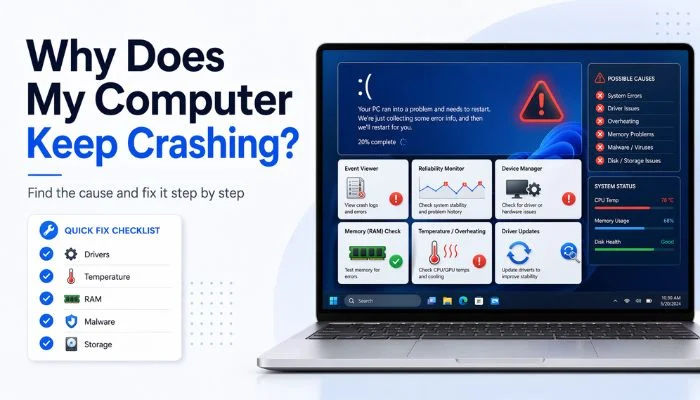
Computer crashing again?
“Why is my PC crashing randomly… even when I’m not doing anything heavy?”
Yeah, this gets frustrating fast.
Maybe it crashes while gaming, browsing, or even just sitting idle. Sometimes it restarts. Sometimes it freezes.
Here’s the truth:
Your PC isn’t crashing for “no reason”. There’s always a cause — you just need to find it.
Let’s break it down and fix it step by step.
Key takeaways
- Your PC doesn’t crash randomly — it’s usually caused by overheating, drivers, RAM, or storage issues.
- If crashes happen during gaming, it’s often GPU or temperature-related.
- If crashes feel random, check RAM and drivers first.
- You can find the exact cause using Event Viewer or Reliability Monitor.
- Updating graphics and network drivers fixes many crash issues quickly.
- Running a memory test (mdsched.exe) helps detect faulty RAM.
- Malware and low disk space can also lead to frequent crashes and slow performance.
- Follow a simple fix order: restart → update → test → scan → check hardware.
Why Does My Computer (PC) Keep Crashing (Common Causes)
Here are the ones you should check first:
- Overheating → your PC shuts down to protect itself
- Driver issues → outdated or broken drivers
- Bad RAM or hardware → unstable system
- Software conflicts → apps fighting each other
- Storage problems → failing SSD or HDD
Example: If your PC crashes while gaming, it’s often GPU or overheating.
If it crashes randomly, it’s often RAM or drivers.
How to Check Why My PC Crashed
You don’t have to guess. Windows already logs crashes.
Steps:
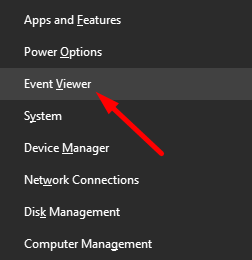
- Press Windows + X
- Click Event Viewer
- Go to Windows Logs → System to view system-related crash errors.
- Look for Error (red icon)
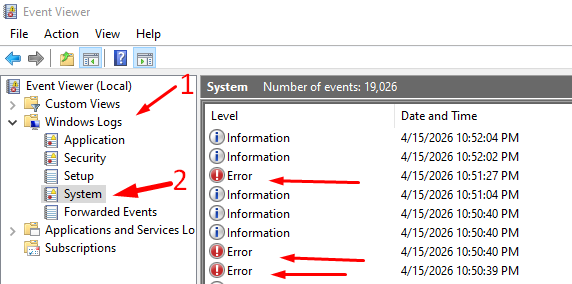
Check the time of the crash and match the error. This tells you what happened before the crash.
📖 You May Also Like This “Laptop/PC” Article: How to Stop Computer & Laptop from Going to Sleep
How to Check PC Crash Log
Another simple way is the Reliability Monitor.
Steps:
- Search Reliability Monitor

- Open “View reliability history”

- Look for red X marks
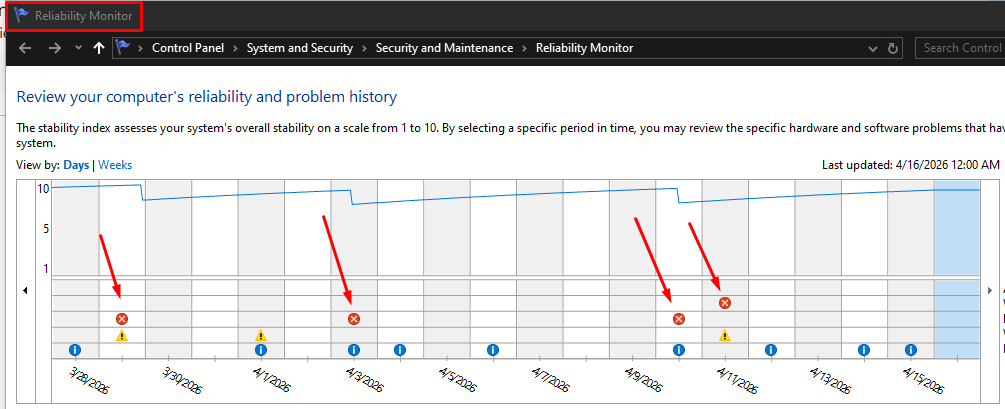
This is easier than Event Viewer and shows a timeline.
How to Stop PC from Crashing
Now let’s fix the most common causes.
Fix 1: Check Temperature (Overheating)
If your PC gets too hot, it will crash.
What to do:
- Clean dust from fans
- Make sure airflow is clear
- Use a cooling pad (for laptops)
Example: If crashes happen during gaming → overheating is likely.
Fix 2: Update Drivers
Outdated drivers cause crashes.
Steps:
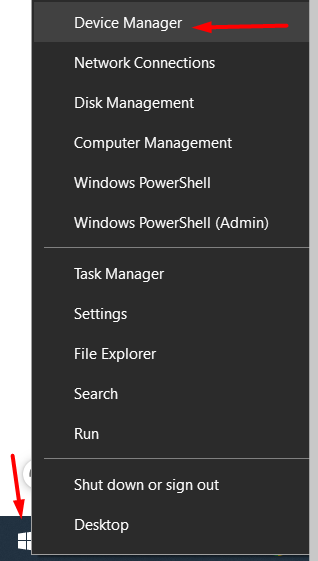
- Right-click Start
- Click Device Manager
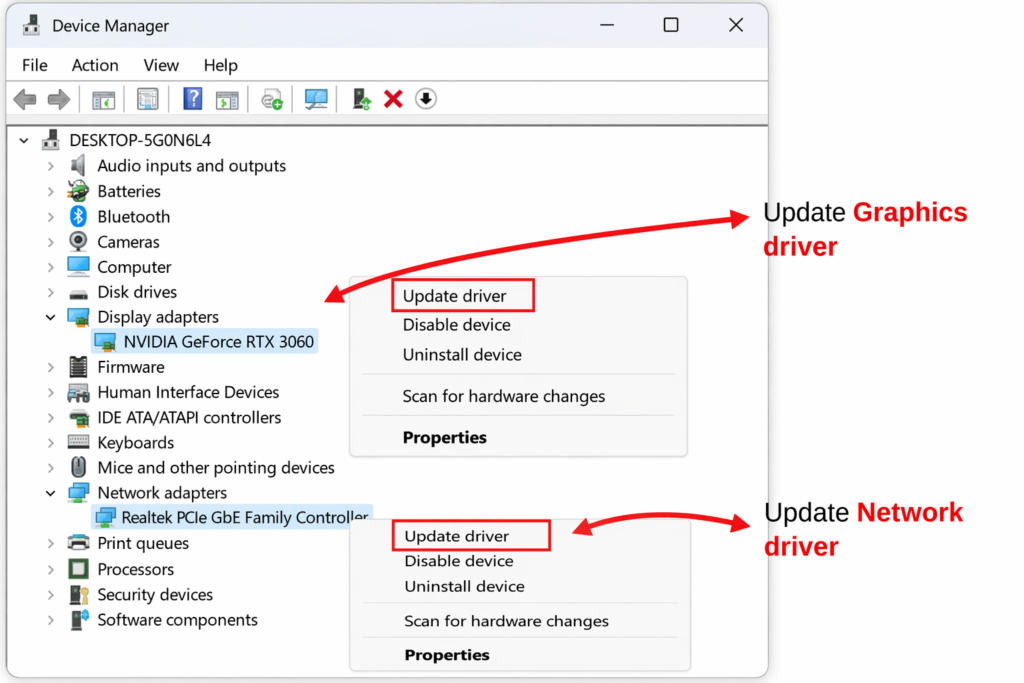
- Update:
- Graphics driver
- Network driver
Fix 3: Check RAM (Memory Issues)
Bad RAM = random crashes.
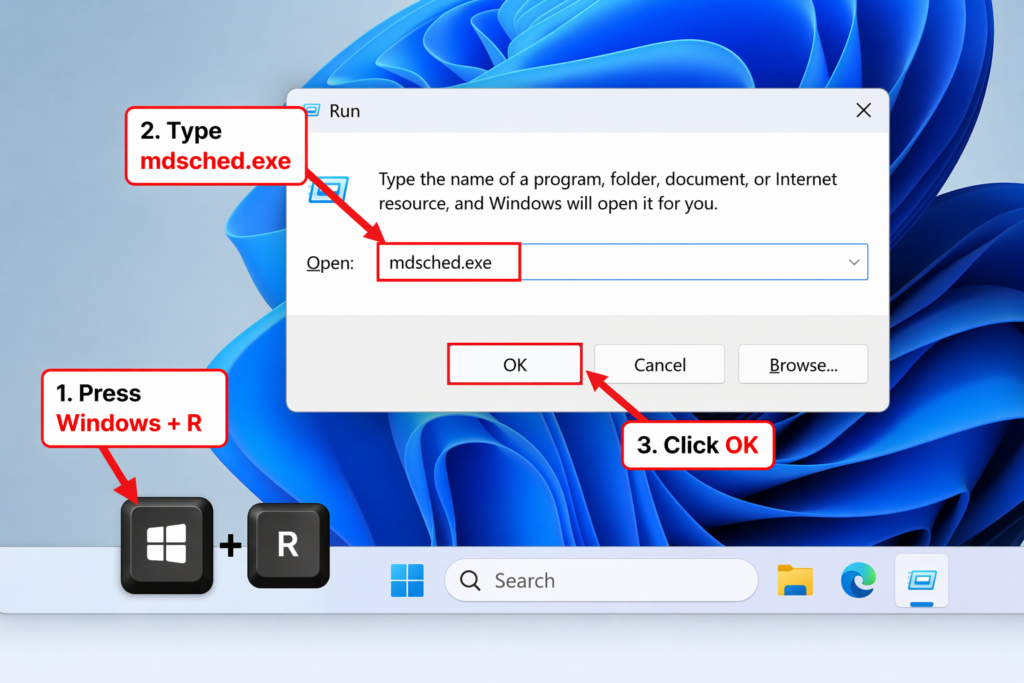
Steps:
- Press Windows + R
- Type mdsched.exe
- Restart and scan
Fix 4: Scan for Malware
Viruses can crash your PC.
- Run Windows Security scan
- Remove any threats
Fix 5: Free Up Disk Space
Low space = crashes and lag.
- Delete unnecessary files
- Keep at least 10–20% free space
📖 You May Also Like This “Laptop/PC” Article: What Is a Refurbished Laptop? Is It Worth Buying?
How to Fix a Computer Crash (Quick Fix Order)
If your PC is crashing and restarting, follow this order:
- Restart your PC
- Update Windows
- Update drivers
- Run memory test
- Scan for malware
- Check storage health
Do this step by step. Don’t try everything at once.
Common Signs Your PC Is About to Crash
Watch for these:
- Freezing before the crash
- Blue screen (BSOD)
- Apps suddenly closing
- Loud fan noise
These signs help you identify the cause early.
FAQs
Why is my PC crashing randomly on Windows 11?
It is usually caused by faulty drivers, RAM issues, or overheating.
What causes a computer to crash?
Common causes include hardware failure, software conflicts, or system errors.
My PC is crashing frequently. What should I do?
Start by updating your drivers, testing your RAM, and running a malware scan.
How can I get my computer out of a crash loop?
Boot into Safe Mode and remove any recent changes or updates.
Final Thoughts
Your PC crashing isn’t random.
It’s a signal that something isn’t right.
Start with:
- Drivers
- Temperature
- RAM
Fix these first, and most crashes go away.
That’s it